
Transcribing audio to text without uploading it
In Italy «trascrizione audio» (audio transcription) is searched on Google about 18,100 times a month, «trascrivere audio in testo» (transcribe audio to text) 12,100 and «trascrivere audio whatsapp» 5,400. These are Google Keyword Planner figures for the last year, and they point to a very concrete need. A lesson to write up, a meeting to minute, an interview for a thesis, a voice message too long to listen to.
The most common move is to find a website, upload the file and wait for the text. It works, but it is worth knowing what you are handing over. A recording contains people's voices and what they said, and it often talks about others. For the European Data Protection Board, voice data is inherently biometric personal data. In this article I try to line up the alternatives that work on your phone or computer, and those that send the audio to a server instead.
What happens when you upload audio online
Not all online services are the same, and the best way to understand this is to read what they write. I picked three widely used ones, without rating them.
- Microsoft Word, Transcribe feature. It requires a Microsoft 365 subscription, allows up to 300 minutes of uploaded audio a month and states that audio files are sent to Microsoft and used only to provide the service.
- Otter.ai. Its privacy policy, in effect since 16 June 2026, provides for training its own AI technology on de-identified audio recordings and on transcriptions, which may contain personal information.
- Rev. Its terms say customer content may be used for continuous training of its speech recognition models, and not for training generative AI models.
There is nothing unlawful in any of this, but if the recording includes students, patients, clients or colleagues, choosing the tool becomes a choice about their data, not just yours.
Options that work on the device
The good news is that today many transcriptions can be done without uploading anything. The differences, however, are large, especially for Italian.
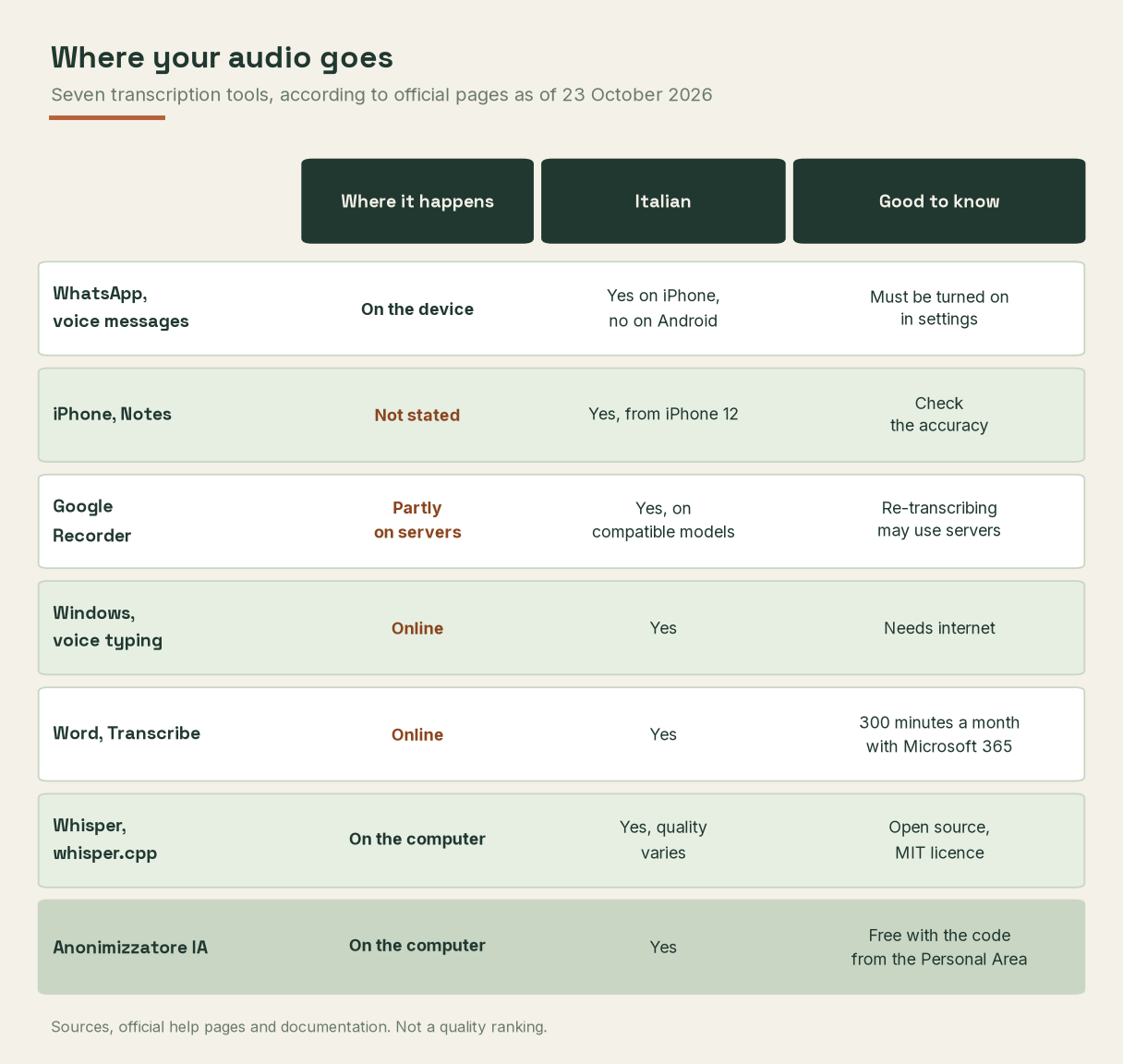
Where your audio goes. Source, the services' help pages and official documentation, checked on 23 October 2026.
WhatsApp voice messages. WhatsApp writes that transcripts are generated on the device and that messages remain protected by end-to-end encryption. The feature must be turned on in Settings, Chats, Voice message transcripts. There is, however, a detail that explains many disappointed searches. On iPhone Italian is supported (from iOS 16), while on Android, for now, only English, Portuguese, Spanish and Russian are.
iPhone, Notes app. On iPhone 12 and later the Notes app records and transcribes audio, in Italian too. Apple asks you to check the accuracy of transcriptions, but in the pages I read it does not explicitly say whether recognition happens entirely on the phone.
Google Recorder on Pixel phones. It transcribes in Italian too, on compatible models. The help page warns, however, that re-transcribing a file may process the audio on Google's servers.
Windows. Voice typing (Windows key plus H) uses Microsoft's online speech recognition, so it needs the internet. Voice access, instead, lets you dictate text without a connection, after an initial online setup, but it is for dictating, not for transcribing a file.
Whisper, the engine behind many tools
Many transcription apps, including those that work on the computer, use Whisper, a speech recognition model released by OpenAI in September 2022 under the MIT licence, code and models included. It comes in several sizes, and the large ones need more memory.

Approximate video memory and speed compared with the large model. Source, official Whisper README on GitHub, checked on 23 October 2026.
Two warnings come straight from OpenAI. The first is that performance varies widely from one language to another. The second is that the model can hallucinate, that is produce text that was never spoken in the audio. A study presented at the ACM FAccT conference in 2024 measured this on more than 13,000 English audio segments transcribed with Whisper's online service in 2023. About 1% of transcriptions contained entire made-up sentences, and 38% of these contained harmful content, such as violence or false associations. It is a figure from a specific case, but it is enough to remember that an automatic transcription must always be reread, especially if it ends up in minutes.
Finally, OpenAI advises against using Whisper for high-risk decisions and against transcribing recordings made without people's consent.
Before transcribing, consent
For schools, the Italian data protection authority (Garante privacy) is clear. A student may record a lesson for personal study, in line with the school's rules. For any other use, and especially to share it, online included, the people recorded must be informed and give their consent. The same common sense applies to a work meeting or an interview. Before pressing the red button, whoever is speaking should know.
Transcribing on your computer with the Anonimizzatore IA
The Anonimizzatore IA (AI Anonymiser) that we distribute free of charge for macOS and Windows transcribes audio on your computer with Whisper large-v3-turbo, from a file (for example MP3, WAV or M4A) or from the microphone. Your documents stay on your computer. To unlock transcription all you need is the free code you find in your Personal Area after signing up for free on retoria.it (the form is in Italian).
The advantage, in my view, lies in the next step. Once transcribed, the text can go through the app's main feature, which replaces names, numbers and other personal data with reversible placeholders. At that point you can ask a chatbot for a summary or draft minutes without handing it people's data, as I explain in the guide on how to anonymise texts. As with any tool, the result must be checked, starting with numbers dictated aloud, which a transcription may write out in words and make harder to recognise.
If you want to try it, create your free account on retoria.it and download the app. If instead you want to bring these tools to your school, firm or office, with a practical course on handling recordings, write to us.
Methodological note
On 23 October 2026 I read the help pages and official documentation of WhatsApp, Apple, Google, Microsoft, OpenAI and whisper.cpp, the privacy policies and terms of Otter.ai and Rev, the European Data Protection Board's guidelines on voice assistants, the Garante's FAQ on schools and the study on Whisper hallucinations in its arXiv version. Microsoft's pages on Transcribe also contain the sentence that audio and results are not stored by the service, while other parts mention saving the file to OneDrive, so it is worth checking your own configuration.
I chose the online services as widely used examples, not as a ranking. I do not report figures on transcription quality in Italian, because I found no verifiable official measurements. The first chart's table marks as «not stated» what the official pages do not say. Search volumes come from Google Keyword Planner for Italy, from October 2025 to September 2026. This article is not legal advice.
Sources
- WhatsApp, announcement of voice message transcripts (21 November 2024) and help centre, how to turn transcripts on, with the languages supported on Android and iOS.
- Apple, iPhone user guide, record and transcribe audio in Notes.
- Google, Pixel help, Recorder transcription and languages.
- Microsoft, voice typing in Windows, setting up voice access and transcribing recordings in Word.
- Otter.ai, privacy policy (effective 16 June 2026), and Rev, terms of service.
- OpenAI, Whisper repository and model card, and ggml-org, whisper.cpp.
- Koenecke A., Choi A. S. G., Mei K. X., Schellmann H., Sloane M., «Careless Whisper, Speech-to-Text Hallucination Harms», ACM FAccT 2024, DOI 10.1145/3630106.3658996, and arXiv version.
- European Data Protection Board, guidelines 02/2021 on virtual voice assistants (7 July 2021).
- Italian data protection authority (Garante per la protezione dei dati personali), FAQ on schools and privacy, question 11.
- Google, Keyword Planner, average monthly search volumes in Italy (October 2025, September 2026), checked on 23 October 2026.